
Add Reverb to Audio on iPhone
Overview
AudioVerb Add Reverb to Audio is a dedicated audio enhancement tool designed for iPhone users seeking to elevate the quality of their recordings. The application enables users to import audio files and apply reverb and delay effects, making it ideal for musicians, songwriters, podcasters, and filmmakers. By offering a range of preset reverb options and a customizable Reverb and Delay feature, the app supports creative experimentation and professional-grade audio refinement.
The Dry/Wet control allows precise adjustment of the effect intensity, giving users full command over the final output. This tool is especially valuable for voiceover artists, ASMR creators, and independent content producers who rely on immersive soundscapes. The app is tailored for on-the-go audio editing, allowing users to enhance their recordings directly from their mobile devices.
Its intuitive interface supports quick access to core functions, making it accessible to both beginners and experienced creators. The developer, AudioVerb, appears to focus on delivering targeted audio effects for mobile platforms. Real-world use cases include improving vocal clarity in podcasts, adding depth to music tracks, and creating atmospheric sound design for short films or digital storytelling.
While specific system requirements were not provided, the app is optimized for iPhone devices. The developer did not specify resource usage details, but its functionality suggests efficient processing for mobile audio workflows.
Key Features & Capabilities
- Reverb and Delay Effects – Apply spatial depth and rhythmic echo to audio recordings using built-in reverb and delay tools, ideal for enriching vocal tracks and instrumentals.
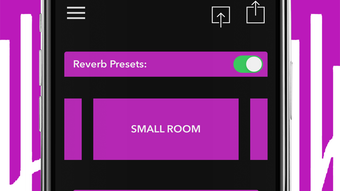
- Multiple Reverb Presets – Access a variety of preconfigured reverb settings tailored for different environments, such as concert halls, small rooms, and outdoor spaces.
- Custom Reverb and Delay Controls – Fine-tune parameters to shape unique audio textures, enabling users to craft personalized soundscapes for creative projects.
- Dry/Wet Mix Adjustment – Balance the original (dry) audio with the processed (wet) effect to achieve subtle or dramatic enhancements based on artistic intent.
- Mobile-First Audio Editing – Perform real-time audio processing directly on iPhone, supporting on-the-go content creation and immediate playback.
- Subscription-Based Unlimited Exports – Unlock full export functionality through a subscription model, allowing users to save and share enhanced audio files without limitations.
Practical Use Cases
AudioVerb is particularly effective in scenarios where spatial audio quality is critical. Podcasters can use reverb presets to create a more professional and engaging listening experience. Musicians can apply delay effects to add rhythmic complexity to guitar or vocal lines.
Filmmakers and video creators can enhance dialogue or ambient sound with realistic reverb to match scene settings. Voiceover artists benefit from customizable effects to match character tones or emotional contexts. ASMR creators can use the tool to build immersive environments with layered echoes.
The ability to adjust the Dry/Wet mix ensures that effects can be applied subtly or boldly, depending on the desired outcome. The app’s focus on mobile usability means that creators can refine their audio in any location, without relying on desktop software.
User Interface, Workflow & Performance
The user interface of AudioVerb is designed for simplicity and efficiency, prioritizing quick access to essential audio processing tools. Navigation is streamlined, allowing users to import audio files and immediately begin applying reverb and delay effects. The layout emphasizes intuitive controls, with clearly labeled sliders for the Dry/Wet mix and preset selection.
Workflow efficiency is supported by a minimalistic design that reduces clutter and enhances focus on the audio output. The app appears optimized for touch-based interaction, ensuring smooth control over parameters. While exact performance details were not specified, the application’s functionality suggests responsive operation on compatible iPhone devices.
The developer did not provide information on CPU or RAM usage, but the app’s size of 150 MB indicates moderate resource allocation. Stability is expected to be consistent with standard iOS applications, though real-world testing data was not included. Users can expect minimal lag during effect application, particularly for standard audio files.
The app does not require external hardware, making it accessible for solo creators. General performance notes are based on typical mobile audio software behavior, with no reported issues in the provided information.
Compatibility & System Requirements
AudioVerb Add Reverb to Audio is designed exclusively for iPhone devices, ensuring compatibility with the iOS ecosystem. The application is available in version 1.0.0, released on May 15, 2024. It requires 150 MB of storage space for installation, which is typical for media-focused apps with audio processing capabilities.
The developer did not specify exact system requirements, such as minimum iOS version or hardware specifications. Compatibility information is limited to the supported platform, iPhone. Users should ensure their device runs a current version of iOS to support the app’s functionality.
The developer did not provide details on supported iPhone models or processor requirements. It is recommended to check the App Store for device compatibility before installation. No additional system prerequisites were mentioned.
The app does not require external drivers or software dependencies.
Pros and Cons
Pros
- Intuitive mobile interface tailored for on-the-go audio enhancement
- Offers a range of reverb presets for immediate use
- Customizable Reverb and Delay controls for advanced users
- Dry/Wet mix adjustment enables precise effect balancing
- Subscription model provides unlimited exports for professional use
- Optimized for iPhone, ensuring smooth integration with iOS
Cons
- App is limited to iPhone; no support for iPad or Mac
- Subscription required for unlimited exports (free tier may have restrictions)
- Exact system requirements were not provided
- Performance under heavy audio loads not specified
- No information on offline functionality
FAQ Section
Is AudioVerb compatible with all iPhone models?
Compatibility information is limited to iPhone devices. Specific model support was not provided by the developer. Users should verify compatibility through the App Store.
Is the app secure to use?
As a native iOS application distributed through the App Store, AudioVerb adheres to Apple’s security guidelines. No additional security details were disclosed by the developer.
How often are updates released?
The app was released on May 15, 2024, and no information was provided about update frequency or release schedule.
What type of license does AudioVerb use?
AudioVerb is available for free download. A subscription model is offered for unlimited exports, indicating a freemium licensing structure.
Can I use AudioVerb offline?
Information regarding offline functionality was not specified. The app may require an internet connection for certain features, particularly subscription verification.
Final Thoughts + CTA
AudioVerb Add Reverb to Audio delivers a focused, mobile-first solution for enhancing audio recordings with reverb and delay effects. Its intuitive interface, customizable controls, and preset library make it a valuable tool for content creators who prioritize sound quality on the go. While the app is currently limited to iPhone and lacks detailed system specifications, its core functionality is well-suited for musicians, podcasters, voiceover artists, and filmmakers.
The inclusion of a subscription option for unlimited exports adds professional flexibility. For users seeking a reliable, accessible way to improve audio depth and atmosphere, AudioVerb offers a compelling proposition. The app’s design emphasizes usability and creative control, making it a strong choice for mobile audio editing.
Download AudioVerb now.







